




كورس مجاني

كورس The Prof Program In Road and Surveying with Civil 3D عربي مجانا من يوديمي

The program consisting of 19 tools in road and survey works

تقييم الكورس

تقييم المصدر: 4.7

عن الكورس

The program consisting of 19 tools in road and survey works

ماذا ستتعلم في هذا الكورس؟

1. Insert SDR & GSI files direct to civil 3d 2. Convert Between Coordinate Systems 3. Export All data to Excel Sheets 4. Manage Export Format 5. Export Latit
1. Insert CSV & TXT to civil 3d with any format 2. Convert Between Coordinate Systems 3. Export All data to Excel Sheets 4. Manage Export Format 5. Export Lat
1. Insert CSV & TXT Lat-Long to civil 3d 2. Convert Between Coordinate Systems 3. Export All data to Excel Sheets 4. Manage Export Format
1. Create All allignments for all polylines 2. Name All Alignmnets 3. Add Horizontal Curves or Not 4. Add Alignments Label 5. Write name& Road Length for all
1. Create Design Profiles For All Roads 2. Add Vertical Curves or Not 3. Set Profile Style & BandSet Style 4. Add Design Profile & Existing Profile to BandSet
1. Create Profile C3D From Cad Profile 2. Set Profile Style & BandSet Style 3. Add Design Profile & Existing Profile to BandSet
1. Create Corridors For All Roads 2. Add Target Surface 3. Create Corridors surfaces 4. Set Overhang & Add as breakline 5. Add Extents Boundary & Fixed Boundary
1. Add Barrier to Roads 2. Draw 3D-Modeling (Barrier & Road Surface) 3. Export Barrier quantity to Excel Sheets
1. Create Corridors For All Roads 2. Add Target Surface 3. Create Corridors surfaces 4. Set Overhang & Add as breakline 5. Add Extents Boundary & Fixed Boundary
1. Add Barrier to Roads 2. Draw 3D-Modeling (Barrier & Road Surface) 3. Export Barrier quantity to Excel Sheets
1. Export Design & Existing Elevations 2. Export Dif. for Design&Ferma with Existing 3. Export Offset Coordinates (x,y) 4. Export Total Length Road(s) 5. Exp
1. Export Sheet Layers For All Roads 2. Set Layers of 1st Layer & 2nd Layer…….
1. Export Catch Coordinates & Offset (R&L) 2. Export Cut / Fill status 3. Export Width and Area of Road surface 4. Export Total Length and total Area for Every
1. Export Elevation & offset for Every Layer 2. Export Coordinates for Every Layer 3. Export specific Range stations
1. Create Road Signs 2. Set Scale & Offset for All Signs 3. Can Put Signs by station Or Range Stations
Prepare DWGs to Create Alignmnets
1. Check Intersection (True or False) 2. Make A Red circle around False Intersections 3. Export Excel Sheet (Check Intersection)

متطلبات الكورس

  • Civil 3d basics
  • Buy a registration for The Prof. program

محتوى الكورس

كورس The Prof Program In Road and Surveying with Civil 3D عربي مجانا من يوديمي

To buy a registration for The Prof. program contact me: at [email protected]

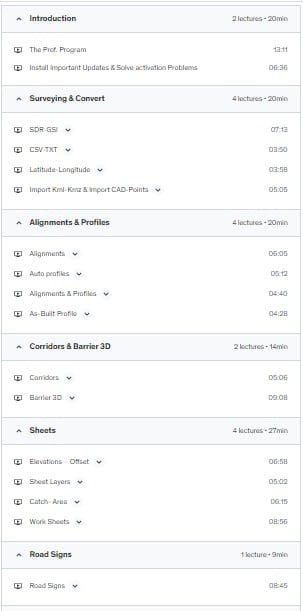
1. Surveying & Convert

1.1 SDR – GSI

1. Insert SDR & GSI files direct to civil 3d

2. Convert between Coordinate Systems

3. Export all data to Excel Sheets

4. Manage Export Format

5. Export Latitude &Longitude
The Prof. Program In Road and Surveying with Civil 3D

1.2 CSV – TXT

1. Insert SDR & GSI files direct to civil 3d

2. Convert between Coordinate Systems

3. Export all data to Excel Sheets

4. Manage Export Format

5. Export Latitude &Longitude

1.3 Latitude & Longitude

1. Insert CSV & TXT Latitude-Longitude to civil 3d

2. Convert between Coordinate Systems

3. Export all data to Excel Sheets

4. Manage Export Format

1.4 KMZ-KML

1. Import KMZ & KML files

1.5 CAD-Points

1. Import CAD files

2. Convert between Coordinate Systems

3. Export all data to Excel Sheets

4. Manage Export Format

5. Export Latitude &Longitude

2. Alignments & Profiles

2.1 Alignment(s)

1 Create all alignments for all polylines

2. Name all alignments

3. Add Horizontal Curves or Not

4. Add Alignments Label

5. Write name & Road Length for all Roads

2.2 Auto Profile(s)

1. Create Design Profiles For All Roads

2. Add Vertical Curves or Not

3. Set Profile Style & BandSet Style

4. Add Design Profile & Existing Profile to BandSet

2.3 Alignment(s) & Profile(s)

* Sum Alignment(s) Tool + Auto Profile(s) Tool

2.4 As-Built Profile

1. Create Profile C3D from Cad Profile

2. Set Profile Style & BandSet Style

3. Add Design Profile & Existing Profile to BandSet

3. Corridors & Barrier 3D

3.1 Corridors

1. Create Corridors for All Roads

2. Add Target Surface

3. Create Corridors surfaces

4. Set Overhang & Add as breakline

5. Add Extents Boundary & Fixed Boundary

3.2 Barrier – 3D Modeling

1. Add Barrier to Roads

2. Draw 3D-Modeling (Barrier & Road Surface)

3. Export Barrier quantity to Excel Sheets

4. Sheets

4.1 Elevations – Offset

1. Export Design & Existing Elevations

2. Export Dif. for Design & Ferma with Existing

3. Export Offset Coordinates (x, y)

4. Export Total Length Road(s)

5. Export Average Dif. for All Roads

4.2 Sheet Layers

1. Export Sheet Layers for all Roads

2. Set Layers of 1st Layer & 2nd Layer…….

4.3 Catch- Area

1. Export Catch Coordinates & Offset (R&L)

2. Export Cut / Fill status

3. Export Width and Area of Road surface

4. Export Total Length and total Area for Every Road

4.4 Work Sheets

1. Export Elevation & offset for Every Layer

2. Export Coordinates for Every Layer

3. Export specific Range stations

5. Road Signs

1. Create Road Signs

2. Set Scale & Offset for All Signs

3. Can Put Signs by station Or Range Stations

6. Other

6.1 Clean

Prepare DWGs to create alignments

6.2 Check Intersect

1. Check Intersection (True or False)

2. Make a Red circle around False Intersections

3. Export Excel Sheet (Check Intersection)

 

لمن هذا الكورس؟

1. Surveying & Convert 1.1 SDR – GSI 1. Insert SDR & GSI files direct to civil 3d 2. Convert between Coordinate Systems 3. Export all data to Excel Sheets 4. Manage Export Format 5. Export Latitude &Longitude 1.2 CSV – TXT 1. Insert SDR & GSI files direct to civil 3d 2. Convert between Coordinate Systems 3. Export all data to Excel Sheets 4. Manage Export Format 5. Export Latitude &Longitude 1.3 Latitude & Longitude 1. Insert CSV & TXT Latitude-Longitude to civil 3d 2. Convert between Coordinate Systems 3. Export all data to Excel Sheets 4. Manage Export Format 1.4 KMZ-KML 1. Import KMZ & KML files 1.5 CAD-Points 1. Import CAD files 2. Convert between Coordinate Systems 3. Export all data to Excel Sheets 4. Manage Export Format 5. Export Latitude &Longitude 2. Alignments & Profiles 2.1 Alignment(s) 1 Create all alignments for all polylines 2. Name all alignments 3. Add Horizontal Curves or Not 4. Add Alignments Label 5. Write name & Road Length for all Roads 2.2 Auto Profile(s) 1. Create Design Profiles For All Roads 2. Add Vertical Curves or Not 3. Set Profile Style & BandSet Style 4. Add Design Profile & Existing Profile to BandSet 2.3 Alignment(s) & Profile(s) * Sum Alignment(s) Tool + Auto Profile(s) Tool 2.4 As-Built Profile 1. Create Profile C3D from Cad Profile 2. Set Profile Style & BandSet Style 3. Add Design Profile & Existing Profile to BandSet 3. Corridors & Barrier 3D 3.1 Corridors 1. Create Corridors for All Roads 2. Add Target Surface 3. Create Corridors surfaces 4. Set Overhang & Add as breakline 5. Add Extents Boundary & Fixed Boundary 3.2 Barrier – 3D Modeling 1. Add Barrier to Roads 2. Draw 3D-Modeling (Barrier & Road Surface) 3. Export Barrier quantity to Excel Sheets 4. Sheets 4.1 Elevations – Offset 1. Export Design & Existing Elevations 2. Export Dif. for Design & Ferma with Existing 3. Export Offset Coordinates (x, y) 4. Export Total Length Road(s) 5. Export Average Dif. for All Roads 4.2 Sheet Layers 1. Export Sheet Layers For All Roads 2. Set Layers of 1st Layer & 2nd Layer……. 4.3 Catch- Area 1. Export Catch Coordinates & Offset (R&L) 2. Export Cut / Fill status 3. Export Width and Area of Road surface 4. Export Total Length and total Area for Every Road 4.4 Work Sheets 1. Export Elevation & offset for Every Layer 2. Export Coordinates for Every Layer 3. Export specific Range stations 5. Road Signs 1. Create Road Signs 2. Set Scale & Offset for All Signs 3. Can Put Signs by station Or Range Stations 6. Other 1. Check Intersection (True or False) 2. Make a Red circle around False Intersections 3. Export Excel Sheet (Check Intersection)

جاهز لبدء التعلم؟

سيتم نقلك إلى المصدر الرسمي للكورس لإتمام التسجيل أو استخدام الكوبون المجاني.
Scroll to Top